I wrote a spec in 90 seconds, took a walk, and came back to a Mac app built for exactly how I work
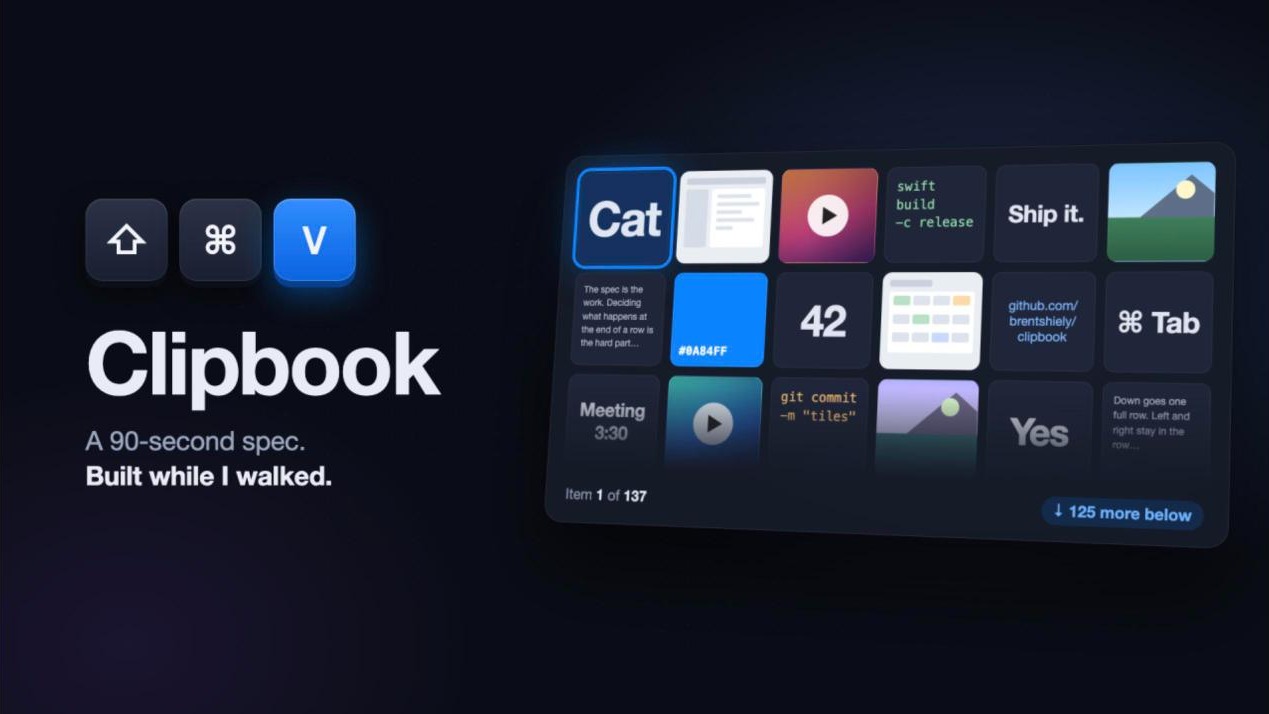
I live on the keyboard. I know virtually every keyboard shortcut. I copy and paste constantly, and the Mac's clipboard is a single slot: copy something new and the last thing is gone.
I wanted a clipboard library: press a shortcut, see everything I've copied, arrow to the one I want, paste it. Never touch the mouse or touchpad. I'm tired of copying something I've already copied only because the clipboard in Mac OS lacks a "clipbook."
I could have shopped for one. I didn't want to. My requirements were specific enough (keyboard only, visual, long memory, my exact shortcut) that I knew I'd spend an evening comparing apps and end up compromising anyway.
So this time I built it, sort of. I wrote a spec, and Claude Code built it while I went for a walk.
The spec: 90 seconds
This is roughly what I wrote. It's the whole product brief:
-
Call it a "clipbook." It remembers everything on my clipboard, most recent first.
-
Shift+Command+V opens it, as an "advanced" paste.
-
Items appear as tiles in a grid. The newest is top left, and it's selected by default.
-
Arrow keys move around. Down goes one full row. Left and right stay in the row.
-
Scroll past the first screen and older history keeps going. No cap.
-
I can clear it at any time.
I also said we should design it before building anything.
The design conversation: a few minutes
Before writing a line of code, Claude Code read my spec back and pushed on the gaps, the way a good engineer or product partner would.
-
My shortcut collided with another one. ⇧⌘V is already "Paste and Match Style" in Chrome, Slack and Notes. Taking it over would break that everywhere.
-
What happens at the end of a row? Does → stop, or wrap to the next row?
-
How long should history last? Forever, or capped?
-
What does Enter do? Copy the selected item to the clipboard.
I answered four multiple-choice questions and accepted three sensible defaults. I chose to take over ⇧⌘V (knowing the cost - zilch), wrap at row edges, keep version 1 minimal, and keep history unlimited until I clear it.
That took a few minutes, and it's the part that felt most like product work. Those decisions shaped everything that followed.
The build: while I walked
I told it to build in unattended mode and went for a brisk 60-minute walk.
It worked in small pieces, committing after each: capturing the clipboard into a local database, the arrow-key navigation rules, the menu-bar app with the global shortcut and the tile grid, and packaging it as a real Mac app.
It didn't just write code and hope. It:
-
wrote automated tests for the risky logic: duplicates, paging past 100 items, the arrow-key rules, skipping password-manager copies;
-
rendered the grid to an image and looked at it to check the layout;
-
copied a test string and confirmed the running app captured it within seconds;
-
and told me plainly what it had not tested, because it didn't want to take over my computer while I was away.
When I got back, I realized I'd forgotten one requirement: "and open it when it's done." I asked, and it opened. Text and images were there, in chronological order, and it worked.
Then I actually used it
Version 1 was what I asked for. Then I used it, and real use showed me what my spec had missed.
1. The tiles were too small to read. I'd asked for a 10×10 grid. On a real screen, the tiles were so small I couldn't tell what was in them. The grid was too dense to be useful.
I changed the spec: 3 rows by 8 columns, with tiles you can actually read. If I copy the word "Cat," the tile should almost shout "Cat." Short text is blown up to fill its tile, and longer text steps down in size. Screenshots and thumbnails are shown whole, not cropped, so I can recognize the whole screen.
2. I needed to know there was more. With more than 24 items, nothing told me the history continued. Now a footer shows where I am and how much is below: "Item 9 of 137 · ↓ 129 more below."
3. Videos looked like blank file icons. I copy video files too (see my prior LinkedIn article about screen captures), and a generic icon tells me nothing. Now a copied video shows a frame from the video with a play button, and older videos in my history got thumbnails too.
4. I wanted to ⌘Tab to it. I'm a keyboard-shortcut person, and a menu-bar-only app never shows up in ⌘Tab. Now, once I've opened it the first time, it's in ⌘Tab like any other app. ⌘Tab to it and the grid opens.
Each of these was one or two sentences from me. Each took minutes to appear.
What it took
-
My time: about 90 seconds for the spec, a few minutes for the design questions, and a handful of one-line requests after that.
-
The result: a native Mac app of roughly 1,100 lines of Swift plus about 300 lines of tests. It's a personal tool with local-only storage, and nothing leaves my Mac.
-
The one thing only I could do: macOS wants a human to approve the permission that lets an app press ⌘V for you. I'm glad it does.
What I took from it
The spec is the work. Typing code was never the hard part of a tool like this. Deciding what happens at the end of a row, or what to do when a shortcut collides with another app's, is. Those were my calls.
Ask before you build. The design questions cost minutes, and they turned surprises I'd have hit later into decisions I made on purpose.
Your first spec will be wrong in ways you can't see yet. Mine specified a grid nobody could read. The difference now is that fixing it costs a sentence, not a sprint. That changes how much you're willing to try.
Small, tested steps make it safe to walk away. Each piece was built, tested and saved before the next one started. That's why I could leave and trust what I came back to.
Software this specific used to be a luxury. I didn't compromise on someone else's idea of a clipboard manager. I got the one I'd have designed if I could code, and it's fully productive for me.
Nobody else needs my exact clipboard tool. That's the point. The interesting shift is that "software built for exactly one person's workflow" is now a reasonable thing to make on a walk.
The code is public too -- if you want to look: github.com/brentshiely/clipbook. Feel free to use it as a starter for yourself.
First published on LinkedIn, October 5, 2026.